How Room Correction Actually Works
DSP-based room correction promises to fix your room's acoustic problems at the push of a button. Here's what it really does, how it works, and where its limits lie.

Callens Audio Labs
Ask me anything
Hi! How can I help?
Ask about our speakers, services, demos, or anything else.
Powered by AI · May make mistakes · Paul is always available
From unboxing to final listening - a detailed walkthrough of how I deliver, position, calibrate, and fine-tune a pair of 8c speakers in a client's home.

One of the questions I get most often is: "What happens after I buy them?" People understand that the Dutch & Dutch 8c aren't just speakers you plug into the wall and forget about. They're a system - active crossovers, built-in amplification, DSP room correction, network streaming - and they deserve a proper setup. That's what I'm here for.
I personally handle every delivery and installation. Not a third-party installer, not a manual you're left to figure out - me, in your room, with a measurement microphone and the time to get it right. Here's what that process actually looks like, from the moment the boxes come through the door to the moment I hand you the remote and say "enjoy."
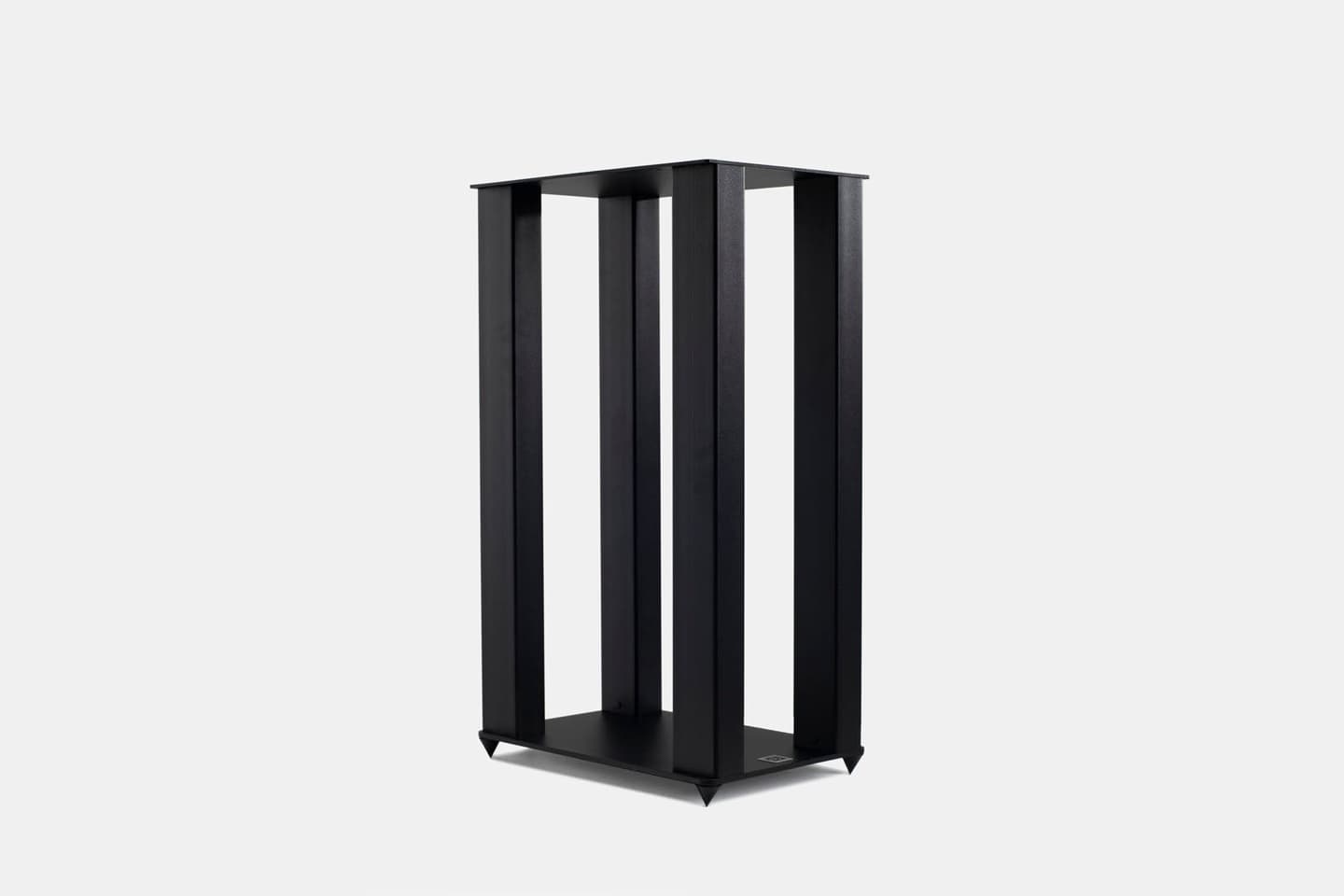
The 8c ships in serious packaging - each speaker weighs about 25 kg, and the boxes are designed to protect a precision instrument. I bring them to your home, unbox them carefully, and inspect everything. Stands, power cables, network cables - it all comes out and gets checked. If you've ordered the dedicated stands, I'll assemble those first. They're beautifully made and designed to put the tweeter at ear height for a seated listener, which matters more than most people realise.
I always bring a few extras: a network switch if your router is in another room, quality ethernet cables, and my measurement kit. The 8c is a networked speaker - it connects via ethernet, not speaker wire - so we need a solid network connection in the listening room.
This is where the 8c fundamentally differs from conventional loudspeakers. Most speakers need to be pulled well away from walls to sound their best, because the boundary reflections create bass peaks and cancellations that muddy the sound. The 8c does the opposite - it's designed to work with the wall behind it.
The rear-firing woofers use a technology Dutch & Dutch calls Boundary Coupled Bass. Inspired by the research of speaker designer Roy Allison, the two bass drivers in the back of each 8c acoustically couple with the front wall. The speaker and the wall effectively become one combined sound source, radiating bass in a controlled, phase-coherent hemispherical pattern. The result is deeper, more powerful bass with less room-interaction problems - and the speakers can sit just 10 to 50 centimetres from the wall.
I'll spend real time on positioning. We're looking for symmetry between the two speakers, equal distance from the front wall, and a good relationship to the side walls and listening position. I use a laser measure for precision. Even a few centimetres matter at this stage, because the boundary distance setting in the software needs to match the physical reality.
With the speakers in position, I connect them to the local network via ethernet. Each 8c has its own network port on the back. Once powered on and connected, they appear on the network and I open the Ascend app - Dutch & Dutch's control software. Ascend runs as a native app on iOS and Android, as a web app at app.ascend.audio, and it's also hosted directly on each speaker, so it works even without an internet connection.
The first step in Ascend is creating a "room" - the app's organisational concept for a stereo pair. I add both speakers to the room, assign left and right channels, and configure the input. Most home setups use the network input for streaming via Roon, but the 8c also accepts AES3 and analog inputs if you're connecting a turntable, CD player, or external DAC.
This is the critical first calibration step. I measure the exact distance from the back of each speaker to the front wall and select the matching preset in Ascend. These presets do two things simultaneously: they ensure a flat frequency response between the speaker and the wall, and they time-align the boundary-coupled bass system with the cardioid midrange driver on the front baffle. Get this wrong and the bass will be uneven or the time alignment will be off. Get it right and the low end is tight, extended, and remarkably clean.
I also set the input gain, check that both speakers are running the latest firmware, and configure any presets the client might want - for example, a slight bass shelf for late-night listening at lower volumes.
With the speakers positioned and the boundary settings configured, the system already sounds very good. But "very good" isn't the goal - the goal is to make the room as transparent as possible. This is where REW comes in.
REW - Room EQ Wizard - is free, open-source room measurement software that integrates directly with the 8c. I use it with a calibrated miniDSP UMIK-1 measurement microphone. The computer running REW and the 8c speakers need to be on the same local network, and once REW detects the speakers, I can control the measurement sweep directly from the software.
I don't just measure at one point. Room resonances - standing waves created by the interaction of sound with the walls, floor, and ceiling - vary significantly across different positions. A peak at the main listening position might be a dip half a metre to the left. So I measure at multiple locations: typically seven points arranged around the listening area, covering front-to-back, left-to-right, and up-and-down variation. The microphone always points forward, towards the front wall.
Each measurement takes about thirty seconds. REW sends a logarithmic sine sweep through the speaker, the microphone captures the room's response, and the software records the full frequency response curve. After all seven measurements are done, I calculate the spatial average - a single curve that represents the typical behaviour across the entire listening area, not just one specific head position.
With the average response loaded, I open REW's EQ tool and set the target. The equaliser is set to "Dutch & Dutch 8c" - REW has native support for it - and I define a target curve. For in-room listening, I typically enable the room curve option, which applies a gentle 1 dB-per-octave rise below 100 Hz to match the preferred in-room response that most listeners find natural.
The match range is key. I set the upper limit to the room's approximate Schroeder frequency - the transition point where the room stops behaving like a resonator and starts behaving like a reflector. For most domestic rooms, this falls somewhere between 150 and 300 Hz. I'll eyeball it from the unsmoothed response: where do the large peaks and dips from standing waves end and the finer variations from reflections begin? That's my upper boundary. Below this line, we correct. Above it, we leave alone.
REW calculates a set of parametric EQ filters - usually between five and ten - that flatten the peaks in the low-frequency response. Peaks are the priority. Dips are harder to correct and attempting to boost them often does more harm than good, consuming headroom over a narrow band that the ear barely notices anyway. The software shows me the predicted result overlaid on the original measurement, and in most rooms the improvement is dramatic - 10 to 15 dB peaks at resonant frequencies simply vanish.
Once I'm satisfied, I send the filter set directly from REW to the speaker over the network. Each speaker gets its own set of filters, calculated from its own measurements, since left and right speakers interact differently with the room. The filters load into the 8c's built-in DSP - no external processor, no additional box in the chain.
I never take the predicted curve on faith. After loading the filters, I run a fresh measurement at the centre listening position and overlay it against the uncorrected response. This is the moment of truth - and honestly, it's one of my favourite parts of the job. Seeing a jagged, room-dominated response flatten out into something smooth and controlled is deeply satisfying, every single time.
If the result isn't quite right - maybe a stubborn resonance needs an extra filter, or the overall level needs a small adjustment - I iterate. Sometimes it takes two rounds, rarely three. The 8c's DSP has enough filter resolution to handle virtually any room.
Here's where the measurements end and the music begins. I sit down with the client in the listening position and we play music - their music. The system is now calibrated: positioned, boundary-coupled, room-corrected. But calibration is a starting point, not the final word. Some people prefer a touch more warmth in the low end. Others want the most neutral, studio-accurate response possible. The Ascend app lets me create different voicings and presets that the client can switch between.
I always do this part with music, not test tones. We'll play a few tracks the client knows intimately and I'll ask: "Does the bass feel right? Is the vocal natural? Is there anything that feels off?" Their ears in their room with their music - that's the ultimate test. I'll make small adjustments in real time until they light up and say "that's it."
“Measurements tell you what the room is doing. Your ears tell you what the music needs. You need both.”
Before I leave, I walk the client through everything they need to know to live with the system day-to-day. The Ascend app is intuitive - the central gain circle controls volume, you can switch inputs, toggle presets, and adjust voicing with a tap. I show them how to use Roon if that's their streaming platform, how to select presets for different listening modes, and how to put the speakers to sleep or wake them up.
I also save all the REW measurement files and filter configurations. If anything changes - the client moves the furniture, adds acoustic treatment, rearranges the room - I can come back and re-measure. The initial calibration is included in every purchase, and re-calibration visits are always available.
I could ship the speakers and email a setup guide. The Ascend app is well-designed, and Dutch & Dutch's documentation is excellent. A technically inclined person could get decent results on their own. But "decent" isn't what I'm after. The difference between a self-installed 8c and a properly measured and calibrated one is not subtle - it's the difference between a very good speaker and a system that genuinely disappears, leaving only the music.
My background is in signal processing and acoustics. I spent years at EPFL studying exactly this - how sound behaves in rooms, how digital filters can correct for it, how human perception interacts with the physics. Setting up the 8c isn't a chore for me. It's applying everything I've learned in the most direct, musical way possible. And seeing a client's face when they hear their favourite album like they've never heard it before - that's why I do this.
If you're considering the 8c, or if you've already bought a pair and want them properly dialled in, get in touch. I serve clients across the Lausanne region and beyond. Every setup is personal, every room is different, and I genuinely enjoy the process. Let's make your room disappear.